
Key Takeaways
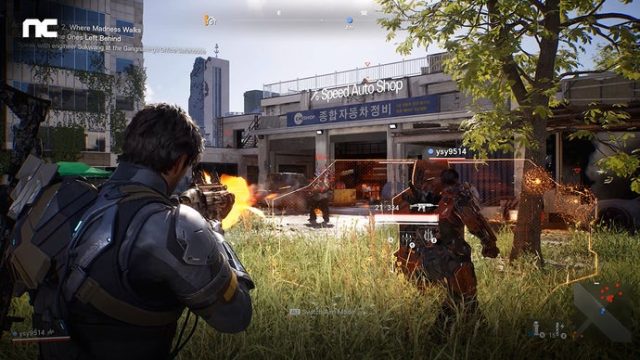
- Cinder City is set in a futuristic version of Seoul.
- Available on Steam and other major gaming platforms.
- Check system requirements before downloading.
- The game features multiplayer combat and tactical gameplay.
- Download instructions are user-friendly for all platforms.
Game Overview
Cinder City stands out as an innovative MMO shooter that immerses players in an action-packed, tactical environment. Set against the backdrop of a futuristic Seoul, this game offers a unique blend of strategy and fast-paced combat. Players can expect to collaborate with teammates and devise tactics to outsmart opponents, all while exploring a richly detailed urban landscape. With its engaging gameplay and vibrant visuals, Cinder City is poised to attract both casual and hardcore gamers alike.
Platform Availability
Cinder City is primarily available through major digital distribution platforms, including:
- Steam
- Epic Games Store
- Other potential console platforms (specific availability to be confirmed)
This wide availability ensures that players on various systems can experience the game seamlessly. Keep an eye out for updates regarding console releases and additional platforms.
System Requirements
Before diving into the download, it's crucial to ensure that your system meets the necessary specifications to run Cinder City efficiently. Here are the updated system requirements:
Minimum Requirements
- OS: Windows 10 (64-bit)
- Processor: Intel Core i5-2500K or AMD equivalent
- Memory: 16 GB RAM
- Graphics: NVIDIA GeForce GTX 960 / AMD Radeon RX 560
- DirectX: Version 11
- Network: Broadband Internet connection
- Storage: 50 GB available space
Recommended Requirements
- OS: Windows 10 (64-bit)
- Processor: Intel Core i7-6700 or AMD equivalent
- Memory: 32 GB RAM
- Graphics: NVIDIA GeForce GTX 1070 / AMD Radeon RX 580
- DirectX: Version 12
- Network: Broadband Internet connection
- Storage: 50 GB available space
These specifications have been revised to ensure better accessibility for players, allowing more gamers to join the Cinder City community without the need for high-end hardware.
How to Download
Getting your hands on Cinder City is a simple process. Follow these steps to download and install the game:
For Steam Users
- Open the Steam client on your computer.
- Log in to your account or create a new one if you don't have one.
- In the search bar, type "Cinder City" and hit enter.
- Select the game from the search results.
- Click on the "Add to Cart" button, then proceed to checkout.
- Complete your purchase, and the game will be added to your library.
- Navigate to your library, find Cinder City, and click the "Install" button.
For Epic Games Store Users
- Open the Epic Games Launcher on your device.
- Log in to your account or sign up for a new account.
- Search for "Cinder City" in the store.
- Select the game and click on "Get" to add it to your account.
- After purchasing, navigate to your library.
- Click "Install" to begin downloading the game.
Conclusion
Cinder City is an exciting addition to the MMO shooter genre, promising intense gameplay and strategic combat. With its recent updates to system requirements, more players can now enjoy the thrilling experience this game offers. Make sure your system is ready and follow our guide to download Cinder City easily. Don’t miss out on the action; join the vibrant community today!